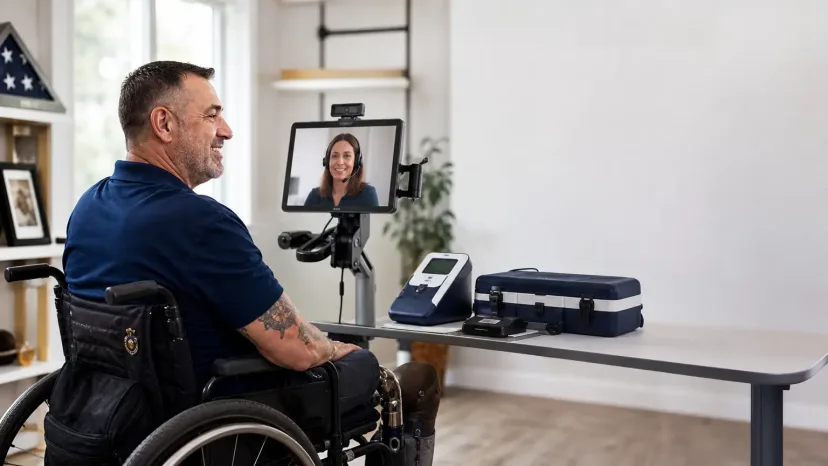
Identity Assurance Level 3 (IAL3) is NIST's highest level of identity proofing. It is designed for high-risk access, but its on-site and device requirements can create a serious barrier when a person cannot easily travel to a fixed verification location.
Trust Swiftly removes that barrier by bringing the IAL3 session to the person. We can deliver a controlled verification kit configured for the individual's accessibility needs, establish an approved private setting at their home or another suitable location, and conduct the session with a trained proofing agent. When the accommodation calls for in-person support, the agent can travel with the equipment to the applicant.
This is especially important for veterans, people with mobility disabilities, homebound applicants, people who live far from an enrollment center, and anyone for whom travel requires significant pain, fatigue, cost, planning, or caregiver support. They should not have to choose between access and high-assurance security.
The principle is simple: keep every required IAL3 control, but bring the controlled session, equipment, and human support to the person.
Talk to us about an accessible IAL3 session at the applicant's location.
Why Accessible IAL3 Is More Than an Accessible Website
An identity proofing flow can conform to WCAG and still be impossible for someone to complete. IAL3 is not only a set of web pages. It is a complete process that includes identity evidence, capture devices, at least one biometric characteristic, direct interaction with a trained proofing agent, a controlled setting, and authenticator binding.
That creates barriers that an ordinary website audit may not find:
| Barrier during an IAL3 session | How an accessible session responds |
|---|---|
| The applicant cannot travel to a fixed kiosk or office | Deliver the controlled kit to an approved location or send an agent with the equipment |
| The applicant cannot hold, aim, or position a device or identity document | Provide an accessible stand, mount, grip, switch, or agent assistance while preserving evidence-handling controls |
| Camera instructions are not usable without sight | Enable screen-reader and audio support and have the agent guide document and biometric positioning |
| Spoken instructions or voice support are inaccessible | Provide live captions, an interpreter, and a text-first communication channel |
| Flashing or visually intense liveness steps create a risk | Configure a non-flashing verification path before the session begins |
| A person needs more time, rest, or a predictable sequence | Plan a longer appointment, explain each step in advance, and allow breaks where the security process permits |
| The applicant uses assistive technology not available on a standard kiosk | Configure and test the controlled device before it is delivered |
Accessible identity verification therefore has two parts. The software must be perceivable, operable, understandable, and robust. The entire proofing ceremony must also work for the individual, including the physical equipment, communication channel, location, timing, and agent procedures.
What NIST IAL3 Requires From the Session and Device
The current NIST SP 800-63A-4 requirements for IAL3 say that IAL3 identity proofing is delivered only as on-site attended proofing. A trained proofing agent must interact directly with the applicant, and the process must collect at least one biometric characteristic in addition to the qualifying identity evidence and core attributes.
NIST allows two ways for the proofing agent to attend:
- The agent and applicant can be together at the approved location.
- The agent can participate remotely while the applicant uses a CSP-controlled kiosk or device in a CSP-controlled setting. NIST calls this the kiosk-based model; earlier guidance called it supervised remote identity proofing.
For a kiosk-based session, the device is not incidental. It is part of the security boundary. NIST requires the device to support high-resolution video monitoring, integrated evidence validation and biometric capture, tamper safeguards, appropriate baseline security protections, and periodic inspection. A link opened on an unmanaged personal phone or computer is not the same as a controlled IAL3 session.
IAL3 also requires:
- qualifying identity evidence — one FAIR plus one STRONG piece, two STRONG pieces, or one SUPERIOR piece;
- validation of the presented evidence, including cryptographic validation when SUPERIOR evidence is used;
- verification that the applicant owns the presented evidence;
- collection and comparison of a biometric characteristic;
- an attended interaction with a trained proofing agent; and
- distribution or enrollment of an initial authenticator during an on-site attended interaction.
None of those requirements says that every applicant must travel to the same office. The fixed requirements are the assurance controls. The location and delivery model can be designed around the population being served, provided the CSP establishes and protects the required setting and equipment.
How At-Home IAL3 Identity Verification Works
Trust Swiftly treats accessibility planning as part of the proofing workflow, not as an exception after someone fails.
1. Identify the person's needs before the appointment
The applicant, the inviting organization, or an authorized representative can request an accommodation before the session. We determine how the person communicates, operates technology, presents identity evidence, and participates in biometric capture. We only need the functional information required to prepare the session; the person does not need to provide an unnecessary medical history.
2. Configure the controlled kit for that individual
The device and peripherals vary by customer deployment and by accessibility need. A kit may be configured with screen reading, magnification, contrast adjustments, speech output, captions, switch access, external controls, hearing-compatible audio, privacy headphones, accessible mounting, or other assistive technology. We test the configuration before dispatch rather than expecting the applicant to set it up during the proofing appointment.
3. Bring the IAL3 environment to the applicant
Depending on the approved deployment, Trust Swiftly can deliver the configured kit to the applicant or send a trained agent with the equipment. The session can take place in the person's home or another approved private and accessible location. The applicant does not need to buy a device, install verification software on personal equipment, or arrange transportation to a distant enrollment center.
4. Conduct the attended proofing session
A trained proofing agent participates for the required evidence collection, validation, verification, biometric, and enrollment steps. The agent explains the process, confirms consent, provides step-by-step assistance, and documents the completed controls. The agent may attend over the controlled device or be physically present, depending on the accommodation and customer workflow.
5. Return or recover the controlled equipment
After the session, the kit is returned through the planned process for inspection and reuse. The applicant is not left responsible for managing a permanent kiosk or maintaining security-controlled equipment.
The result is full-strength IAL3 without making travel a condition of access.
Accessibility for Veterans and People Who Cannot Easily Travel
For some people, “visit an enrollment center” is not a minor instruction. It may require accessible transportation, time away from medical care, help from a family member, management of chronic pain or fatigue, or a trip of several hours from a rural community. For a person who is homebound, it may make the service effectively unavailable.
Veterans can encounter this barrier when identity proofing is required for federal employment, contracting, benefits-related systems, healthcare administration, or access to sensitive agency resources. A high-assurance program should not exclude the people it is intended to serve.
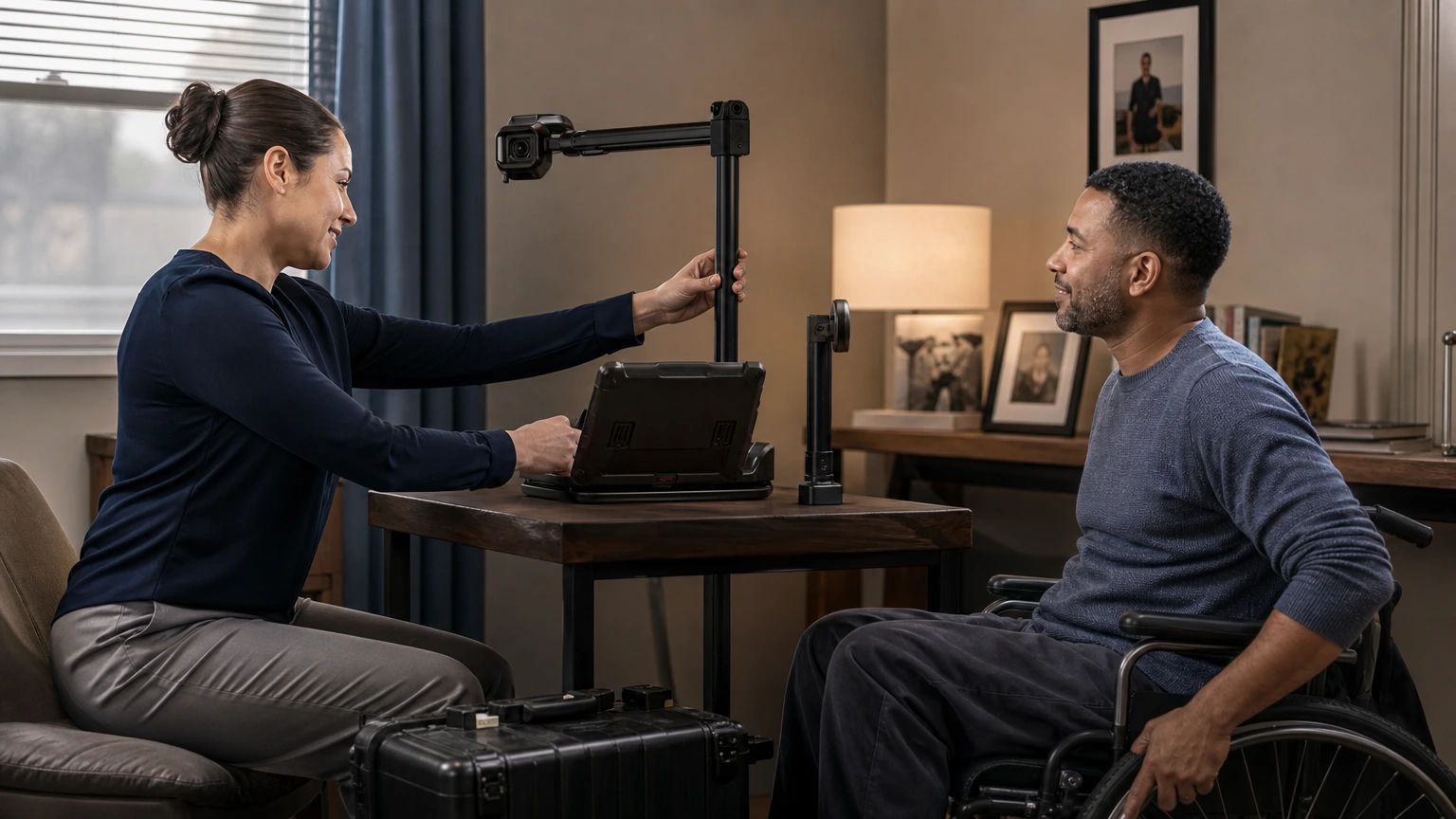
Bringing IAL3 to the person changes the experience:
- A veteran with limited mobility can complete the session in an accessible space at home.
- A person with low vision can receive a device with the required display and speech settings already enabled.
- A person with limited dexterity can use compatible controls and positioning hardware instead of holding a document and device simultaneously.
- A deaf applicant can use captions, text, and interpreter support without relying on a voice call.
- A person whose disability causes pain, fatigue, or cognitive overload can receive advance instructions, a paced appointment, and appropriate breaks.
- A caregiver or support person can be included when appropriate, with privacy, consent, and anti-coercion safeguards defined in advance.
These are examples, not a closed accommodation menu. Trust Swiftly's operating model is designed to evaluate and support any accessibility request while preserving the mandatory IAL3 controls. We configure the kit, physical setup, communication method, scheduling, and agent support around the person.
Accessible Delivery at the Same Assurance Level
An accommodation does not mean skipping identity evidence, bypassing biometric collection, using an unmanaged device, or lowering the pass criteria. It changes how the applicant can complete the required steps.
| IAL3 requirement that stays fixed | Delivery that can adapt |
|---|---|
| The session is on-site attended | The controlled setting can be established at an approved location that the person can access |
| A trained proofing agent participates | The agent can be co-located or join through the controlled device |
| Qualifying evidence is collected and validated | Instructions, positioning support, and evidence-handling assistance can be tailored |
| A biometric characteristic is collected and compared | The capture setup, positioning, pacing, and supported biometric workflow can be planned around the person |
| The device and setting are controlled by the CSP | The kit can be configured with compatible assistive technology before delivery |
| The initial authenticator is bound during the attended interaction | The accessible enrollment instructions and controls can match the approved authenticator |
This distinction matters in procurement. An alternative that drops the applicant to IAL2 may be accessible, but it does not satisfy a program that genuinely requires IAL3. Trust Swiftly is designed to preserve the assurance level while removing the avoidable access barrier.
How Section 508 and WCAG Apply to IAL3 Identity Proofing
Section 508 applies to federal agencies. It requires federal agencies to make information and communication technology that they develop, procure, maintain, or use accessible to people with disabilities. Vendors support that obligation through product conformance, contract requirements, documentation, testing, and accommodation procedures.
The Revised Section 508 Standards incorporate WCAG 2.0 Level A and AA for web content and software. They also contain requirements for hardware, support documentation and services, and functional performance. That broader scope is important for IAL3 because the controlled device and attended service are part of the user's experience.
WCAG applies to the complete digital process. A verification flow should support keyboard and assistive-technology operation, programmatic labels, predictable focus, sufficient contrast, text alternatives, status announcements, adjustable timing where required, and accessible error recovery. A person must also be able to request an alternative without first completing the inaccessible step.
ADA Title II has a separate web and mobile standard. The Department of Justice's Title II web and mobile accessibility rule generally requires state and local government web content and mobile apps to meet WCAG 2.1 Level AA. The compliance date is April 26, 2027 for entities serving 50,000 or more people and April 26, 2028 for smaller entities and special district governments.
Technical conformance is the floor. The Department of Justice also explains that when a person with a disability still cannot use content that meets WCAG, a public entity may need another way to provide effective communication, reasonable modification, and equal access. For IAL3, a configured kit and supported session can be that practical bridge.
Trust Swiftly's Three-Layer Accessibility Model
Trust Swiftly supports accessible IAL3 programs at three connected layers.
1. An accessible self-service flow
The end-user verification and authentication screens are evaluated against the WCAG criteria incorporated into Section 508. Controls have programmatic names and labels, status is not communicated by color alone, focus is managed through revealed steps and dialogs, and custom widgets are designed for keyboard and assistive-technology operation.
2. Alternative paths that are reachable before failure
A user should not have to finish an inaccessible camera, voice, signature, or liveness step before asking for help. The verification hub and supported capture steps provide a route to another configured method or an agent-assisted session. Tenant configuration is governed by a Deployment Profile so that inaccessible method combinations do not undermine the product's conformance claim.
3. A session configured around the individual
When the standard flow is not enough, Trust Swiftly prepares the communication support, equipment, physical setup, and agent procedure for the applicant. That can include delivering an accessible controlled kit, conducting the session with a remote agent, or sending an agent to the person's location. This human and operational layer is what turns accessible software into an accessible IAL3 outcome.
Prospective customers can request our product Accessibility Conformance Report (ACR) and Section 508 Deployment Profile at [email protected]. The ACR covers the end-user verification flow and authentication screens; buyers should always confirm the exact scope of any vendor's report.
What to Ask an IAL3 Vendor About Accessibility
An IAL3 accessibility evaluation should test the whole session, not only the vendor's marketing website.
- Can the session come to the applicant? Ask whether the vendor can establish a controlled IAL3 setting in a person's home or another approved accessible location.
- Who controls the device? For kiosk-based IAL3, ask how the equipment is configured, protected, monitored, inspected, delivered, and recovered.
- Can the kit be configured before delivery? A list of built-in accessibility features is not enough if the applicant cannot enable them independently.
- Can a proofing agent travel to the person? Some needs call for co-located support rather than a remote video session.
- How is an accommodation requested? The route must be available before the applicant encounters an inaccessible camera, voice, biometric, or document step.
- Can the vendor support needs outside a fixed menu? Ask who evaluates an individual request and who is responsible for configuring and testing the solution.
- Does the accommodation preserve IAL3? Confirm that the alternative does not silently lower the applicant to IAL2 or remove a mandatory control.
- Does the ACR cover the actual end-user product? Read the scope paragraph and ask for substantive remarks on partially supported criteria.
- Which deployment settings affect conformance? Tenant colors, assigned methods, support contacts, liveness options, and third-party components can change the outcome.
- Has the complete ceremony been tested? Testing should include the software, device, assistive technology, physical positioning, live interaction, and support path.
Frequently Asked Questions
Can IAL3 identity verification be completed at home?
Yes, when the credential service provider establishes an approved controlled setting and provides the controlled equipment required for an on-site attended session. A trained proofing agent can participate remotely through that device or be physically present. Trust Swiftly can bring this environment to the applicant instead of requiring the applicant to travel to a fixed enrollment center.
Does IAL3 require a controlled device?
The IAL3 ceremony requires sensors and capture devices. When the proofing agent is remote, NIST specifically requires the applicant to use a CSP-controlled kiosk or device with defined monitoring, evidence-capture, tamper-protection, security, and inspection controls. The device is part of the IAL3 trust boundary.
Can an applicant use a personal phone or computer for IAL3?
Not for Trust Swiftly's kiosk-based IAL3 ceremony. An unmanaged personal device does not provide the control and inspection required for this model. We provide the approved device or kit; the exact equipment depends on the customer deployment and the applicant's accessibility needs.
How can a homebound or disabled veteran complete IAL3 verification?
Trust Swiftly can configure a controlled kit for the veteran's needs, deliver it to an approved accessible location, and provide a trained proofing agent for the attended session. If the accommodation requires co-located assistance, an agent can travel with the equipment. The veteran completes the same IAL3 controls without an avoidable trip to an enrollment center.
What accessibility accommodations can Trust Swiftly support?
We can configure the device, peripherals, communication channel, physical positioning, timing, and agent support around the applicant. Examples include screen reading, magnification, contrast changes, captions, interpreter support, text-first communication, switch or external controls, accessible stands and mounts, non-flashing paths, longer appointments, and in-person assistance. We evaluate needs individually rather than limiting applicants to a short preset menu.
Does an accessibility accommodation reduce the identity assurance level?
No. The purpose is to provide an accessible way to complete the same evidence, biometric, attended-proofing, device-control, and authenticator-binding requirements. If a proposed change would remove a mandatory IAL3 control, we design a different accommodation rather than representing a lower-assurance process as IAL3.
What should an agency request for Section 508 review?
Ask for the product ACR, its scope and testing basis, the deployment conditions on which its claims depend, the accessibility support process, and a description of how hardware and attended services support users with disabilities. Trust Swiftly provides an ACR and a Section 508 Deployment Profile for this purpose.
How do I request an accessible IAL3 session?
Contact the organization that invited you using the accommodation details in your verification notice, or email [email protected]. Tell us what you need to complete the session; you do not need to diagnose the technology or choose the equipment yourself.
Bring the IAL3 Session to the Person
Most identity programs begin with a place the applicant must reach. Trust Swiftly begins with the person who must complete the session.
For veterans, homebound applicants, people with disabilities, and anyone for whom travel creates a substantial burden, we can bring a secure IAL3 kit and trained support to an approved location they can access. The equipment can be configured for the individual's needs, and the agent can attend remotely or in person. The accommodation changes the logistics, not the assurance.
If you are planning a federal, workforce, benefits, or other high-assurance program, ask us to demonstrate an accessible session and map the delivery model to your IAL3 and Section 508 requirements.
Talk to Trust Swiftly about accessible IAL3 identity verification.
References
- NIST SP 800-63A-4 — Identity Proofing and Enrollment
- NIST SP 800-63A-4 — IAL3 Requirements
- U.S. Access Board — Revised Section 508 Standards
- Section508.gov — Accessibility Conformance Reports and VPAT
- U.S. Department of Justice — Title II Web and Mobile Accessibility Rule
- Trust Swiftly — NIST IAL3 Verification
- Trust Swiftly — IAL3 Verification and the Employee Experience